Planet-Tanager Integration
This document explains how the Planet API has been integrated into the datalab-tools application.
Planet provides an SDK for interacting with their API. We leverage this SDK via our own wrapper, making it possible to do full unit and integration testing of our own business processes.
The image below shows a mock scene structure including the features, scene trimming and some mock site locations. This is the data used in our integration tests.
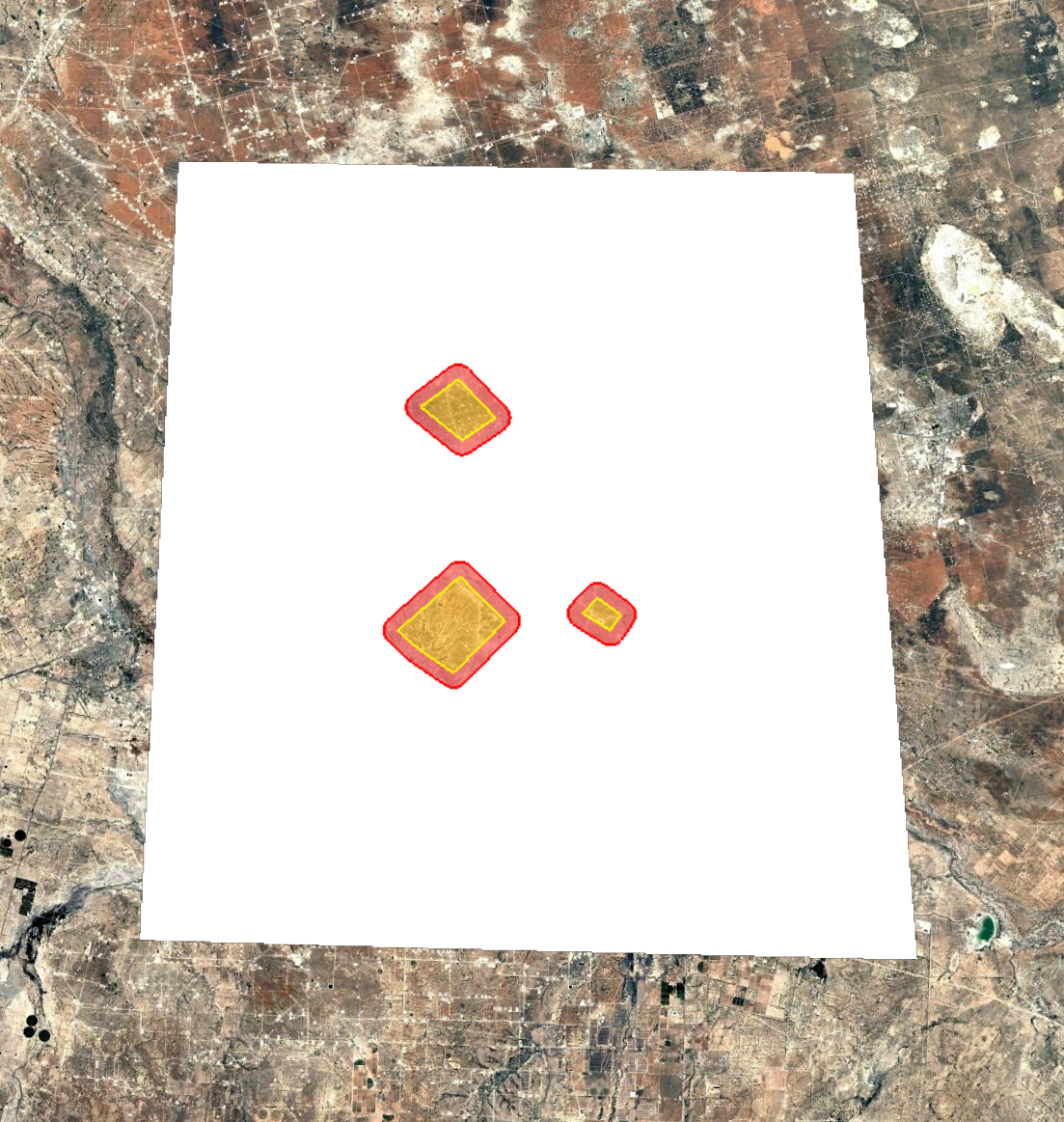
The following are seen in the image.
- White - a Planet
ortho_ql_ch4scene polygon. - Yellow - The features (as would be imported into the Feature Manager on the Planet platform).
- Red - the buffer around the features. This is used for our filtering of emission data.
Features API and cost model
For 2026 Planet now uses a features model. Prior to downloading any data we must first define a set of features. Features are areas of interest (they are polygons) that define an area that we want to get data within. Collections are groups of features.
We have new programs that are used to create a collection and features within that collection. See the planet_tanager/features module for the individual programs. We have the option of creating a feature around a point or from a list of sites.
Feature creation is relatively simple and can be verified on the Planet platform. It is low risk as a new feature can simply be deleted directly on the platform.
Reserving quota
Features can be created and destroyed without consequences before any quote has been reserved. So it is okay to experiment and confirm in the Planet platform that you are happy with the areas defined. Once confirmed, then we can reserve quota. The quota reservation can only be done in the platform and not via the API. This is self-explanatory but it is our understanding this can only be done once, so be careful what areas you reserve.
Once quote has been reserved, trying to download data within the area of interest will proceed. Prior to quote reservation there will be errors, although these errors do not make it clear that the issue is the quote not being reserved.
Emission data trimming
Searching for data is done using our feature collection as the geometry. Howwever, the Planet search API returns more data than we would expect. The way this appears to work is that if we have a feature that intersects anywhere on a scene, the entire scene is returned along with all data associated with it. This includes emissions at locations outside our area of interest. This is likely because of how the Planet data model works, scenes are a singular object and cannot be split up into the parts that intersect with our areas.
Since we only require data within the area of interest we trim the results down. As some of the sites are large and emission locations can be approximate only we add a buffer around our features to ensure we capture all relevant data. The size of the buffer is configurable, and for now we have this set to 500 metres. So the feature is expanded outwards 500 metres in all directions. Only emissions that are within this area are retained. See the image above to see the features (yellow) and the buffer (red) and how they are a subset of the entire scene (white).
Scene trimming
Because we filter emission data to only the areas of interest (features plus a buffer, shown in red in the image above) we also need to cut the scenes down. If we still imported the full scene then we would potentially create false non-detects at locations where the emission data has been removed (by our process) but the scene coverage still exists.
This does create a potential problem if we want to modify areas of interest later or add other operators. It may be okay though since scenes are owned rather than shared across operators. Scene updates would be required if the operator wanted to modify historic scenes by adding features.
Scene trimming is fully covered in tests using the data in the screenshot above. We confirm the trimmed scenes matches our expectations both with and without a buffer around the features.
Duplication due to scene trimming
In the image above we can see how one scene is transformed into three disjoint areas. This is a problem as it is now a MULTIPOLYGON but the Aershed platform only allows scenes with a POLYGON. We work around this by expanded out each scene into a scene for each area. In the example above, this gives us three scenes.
Expanding into multiple scenes creates an issue with duplication in the scene_id. To work around this we add a suffix to each scene_id such as _0, _1 and so on. This allows us to import the scenes. It is important that this suffix be removed at certain points during process, and not at others, for example
- When comparing already imported scenes with the Planet search results we must strip the suffix and deduplicate, such that
scene_idandupdated_timecan be compared. - When filtering scenes during processing to remove already imported scenes from the output file we keep the suffix. In this case the full
scene_idis compared (since we are not able to import updates toupdated_time). This will keep occurring on rechecks of historic data throughout our look-back period so it is important to be able to filter here to avoid creating an error in the next step. - When checking during import if we have already imported a scene we keep the suffix and compare directly on the full
scene_id. If there is a match here an error is raised as no scene should get this far through processing if it already exists in the Aershed database.
Automation
The main process for checking and importing new data consists of two steps.
Check for new data
First we call the planet_tanager.check_for_new_data program with the appropriate configuration. For the PL956 job this consists of the PL956 collection and a start date of 1st of July 2026 for the initial job, and from then on with a look back of 30 days. The reason for the look back is explained below.
Each job execution creates a new folder with the current timestamp. This is the same for all automation jobs.
Handling updates
Planet will sometimes produce a scene with no emissions and then update the scene a few days later with the emission records. When we first import the scene we will not have these records. For the 2026 data Planet now updates the updated_time on scene records, so for each search when checking for new data we check to see if a scene we already have has a different update time.
We cannot import updates to scenes in the Aershed platform. So once a scene is updated we have no choice but to keep rechecking it throughout the 30 day look back, as there is no way for us to update our source of truth (the Aershed database) to record the fact we have seen and processed the update. This creates a load on the Planet system, and makes our process slow, by having to download the scene and the associated data each day.
Part of the complication is the fact that we can see the scene is updated, but to actually see what has changed we have to download the actual JSON file and TIF image associated with that scene. This is the root of the problem.
To work around this problem we keep a local download cache that is update time aware. What this means is when we query our cache to see if we have already downloaded the relevant assets for a scene, the cache is aware of the update time associated with those assets. This is encoded in the filename and the system handles this while treating the cache like a normal file system, so the update time is somewhat abstracted away.
This approach enables us to avoid downloading the update assets every time we have to recheck. However, we still have no way of reliably knowing if our scene and the associated assets (emissions) in Aershed has actually been updated. The scene itself is not such an issue, if it has an old updated time that is okay. The issue is the emissions, we need to know if these have been updated. So we now store a scene_last_updated field on Planet records, and when a scene is reprocessed each day during the look back period we check if the update time on the associated emissions with identical record_id in Aershed matches the emissions that we get from the scene. If the update time does not match, or the emission does not exist at all, we import the updated record and the platform handles the update based on the matching record_id.
This system works well and saves as much downloading and processing as possible. It still means we are rechecking any scenes with an update time that does not match the initial update time that scene was downloaded with repeatedly throughout the look-back period. However, this is only a small amount of processing time and is limited to the 30 day period.
Import
The second step is the importer for emissions and scenes, this can be called via the generic importer importers.generic which will identify the correct importer based on the import metadata file. This importer is to target the specific folder for that timestamp only. It is a wrapper around the data-pipelines import scripts and enables checking for existing records and other validation. Since we need to enable data updates the check for existing data is bypassed for automated jobs but can be used if doing manual imports.
Technical details
The following is a brief explanation of the program structure.
This planet_tanager module is used to check for new Planet Tanager data, download that data and then process it in a form ready for import. These modules also pull data from the Aershed database to determine what needs to be downloaded and prevent duplicate imports.
The part of the program responsible for the retrieval of assets is structured in layers. This design enables us to properly test each component, avoid too much business logic in one place, and reduce coupling directly onto the Planet SDK.
- Planet API layer. See the
IPlanetAPIinterface. The implementation that is a thin wrapper around the Planet SDK. - Planet service layer. See the interface
IPlanetService. The implementation handles the search for new data and filtering by image type and sensitivity. The business logic for file naming, and checking for existing downloads in the download folder is done in this class. - Platform database layer. This has the interface
IPlatformDBand handles retrieving sites and existing scenes from the Aershed database. - Download layer. This combines the
IPlatformDBandIPlanetServicelayers to filter search results by sites of interest and existing scenes in the platform. It stages the scenes for download, and calls then service layer to perform the download.
The download layer is called directly from the program check_for_new_data with the dependencies injected. After assets have been downloaded the main scripts then calls the processing function which splits the combined plume images into distinct plumes and extracts the corresponding JSON files. These are then placed into the emissions folder alongside a CSV file with a row for each detection. The new scenes are placed into the scenes folder in a CSV.